Your menu.
Their phone.
Zero friction.
QR code ordering and payments for restaurants. Customers scan, browse your menu, order, and pay - all from their phone. No app needed.
Free to start · No credit card required · Setup in 30 minutes
Features
Everything you need to modernize service
From QR code menus to real-time analytics, ServeMyOrder gives your restaurant a complete digital upgrade.
QR Code Ordering
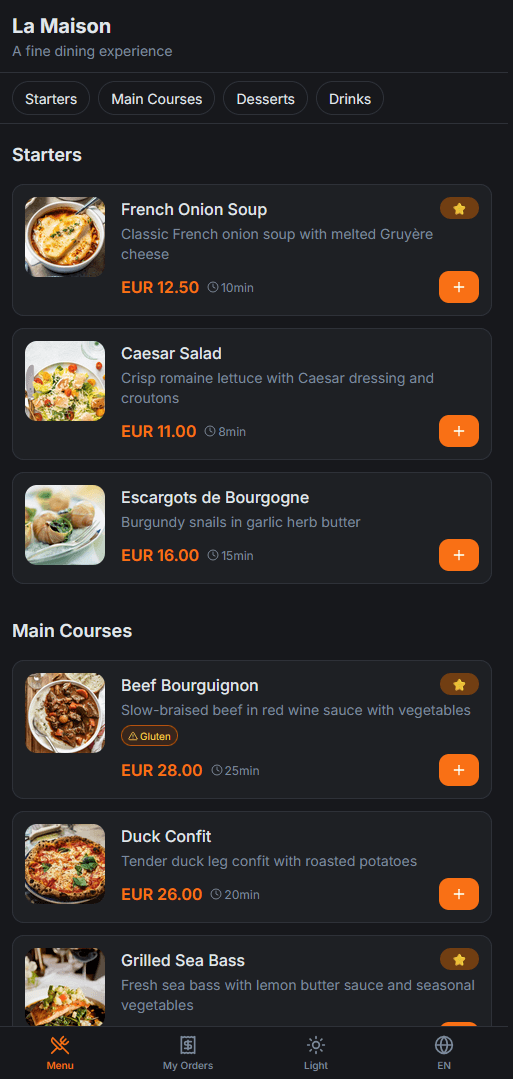
Customers scan a table QR code and instantly access your digital menu. No app downloads, no waiting.
Full Menu Management
Create categories, add items with images and descriptions, set prices, and manage availability in real-time.
Integrated Payments
Accept payments via Stripe or cash. Customers pay from their phone - no card machines needed at the table.
Live Dashboard
Real-time order tracking, analytics, revenue reports, and client insights - all in one beautiful dashboard.
Kitchen & Waiter Screens
Dedicated views for kitchen staff and waiters. Orders flow in real-time with status updates and priorities.
Multi-Language
Menus and interfaces available in English, French, and Spanish. Serve international customers effortlessly.
Waiter Call System
Customers can call a waiter with an optional note. Waiters receive instant notifications on their dashboard.
Table Assignments
Assign tables to specific waiters. They see their tables' orders first, with other tables accessible below.
Roles & Audit Log
Owner, Manager, Waiter, Kitchen roles with granular access. Full audit trail of every action taken.
See It In Action
Beautiful on every device
Your customers order from their phones. Your team manages everything from the dashboard.
Browse & order from the menu

Track your order in real time
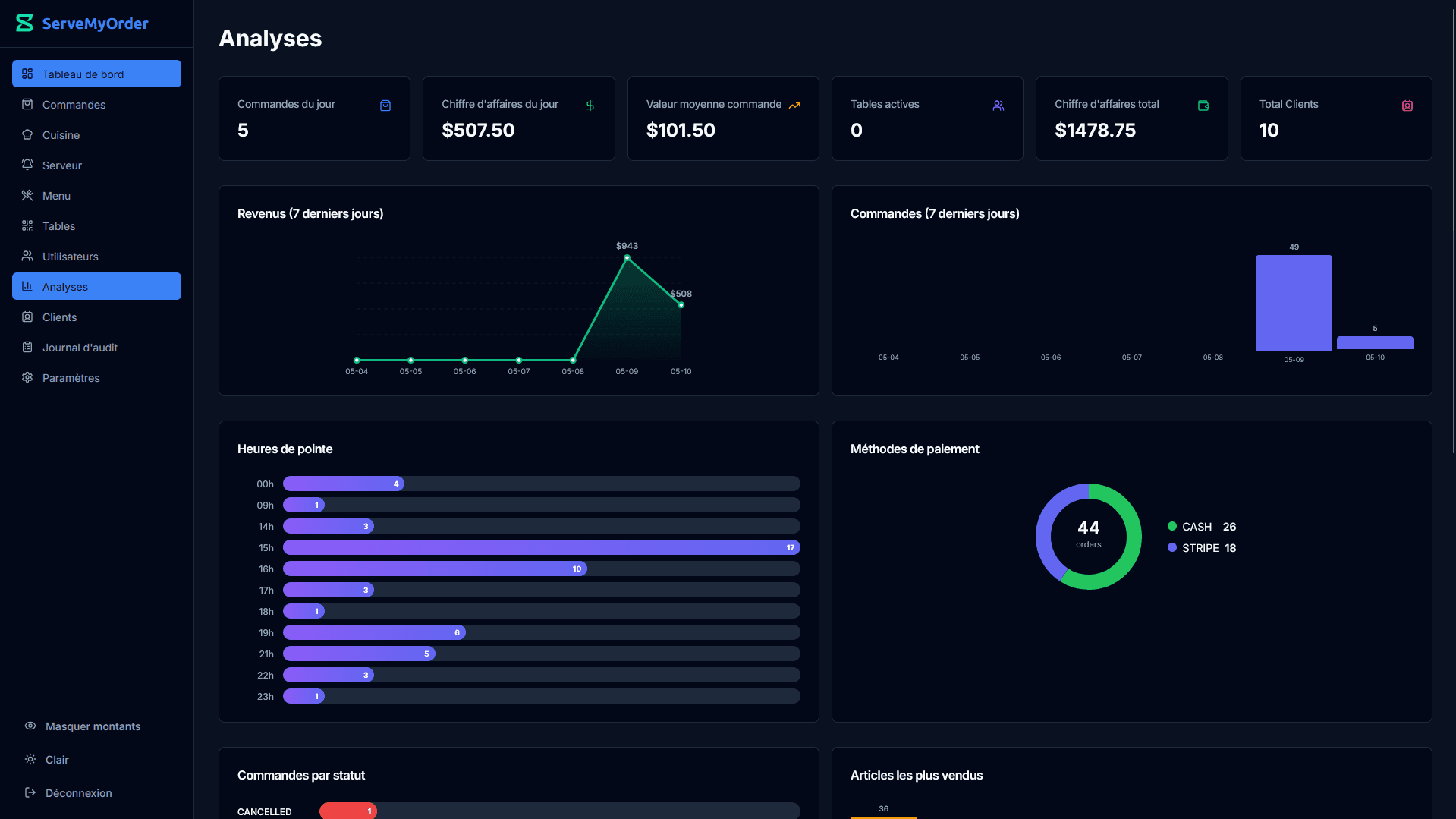
Manage everything from the dashboard
How It Works
Up and running in 4 simple steps
Get your restaurant set up in under 30 minutes. No technical skills required.
Create Your Restaurant
Sign up, name your restaurant, upload your logo, and configure settings like tax rates and currency.
Build Your Menu
Add categories and items with photos, descriptions, and prices. Toggle availability instantly.
Set Up Tables
Create your tables and download unique QR codes. Print them and place on each table.
Start Receiving Orders
Customers scan, order, and pay. You see everything in real-time on your dashboard, kitchen, and waiter screens.
Pricing
Pricing built for every stage of growth
Acquire customers with zero-friction onboarding, scale with data-driven operations, and expand with enterprise-grade support.
Acquisition plan
Basic
For small cafes, snack bars, and new restaurants
Launch faster, validate demand, and start collecting digital orders without upfront cost.
- ✓Up to 5 tables
- ✓Up to 150 orders per month
- ✓Standard ServeMyOrder QR codes
- ✓Digital menu management
- ✓Basic order dashboard
- ✓7-day order history
- ✓Cash payments
- ✓Email support
Primary growth plan
Premium
For growing restaurants that need speed and control
Then usage-based pricing for extra volume
Increase table turnover, improve service speed, and make better decisions with live operational data.
- ✓Unlimited tables
- ✓Up to 2,000 orders per month
- ✓Custom branded QR codes
- ✓Stripe + cash payments
- ✓Full analytics dashboard
- ✓Kitchen display screen
- ✓Waiter assignments
- ✓Multi-language menus
- ✓Priority support
Consultative plan
Enterprise
For chains, franchises, and multi-location operations
Standardize operations across locations with dedicated infrastructure and tailored rollout support.
- ✓Unlimited tables and orders
- ✓Multi-location management
- ✓Unlimited staff accounts
- ✓AI recommendations
- ✓Dedicated computing instances
- ✓Custom domain
- ✓White-label branding
- ✓API access
- ✓Custom integrations
- ✓SLA-backed support
- ✓Dedicated account manager
Included in every plan
Pricing FAQ
Do I need a credit card to start?
No. You can start on Basic without a credit card and begin taking orders immediately.
Can I change plans later?
Yes. Upgrade or switch plans as your volume grows, so your tooling always matches your service pace.
What happens if I exceed the monthly order limit?
You can keep operating. We apply usage-based pricing for additional volume so service is never interrupted during busy periods.
Do you offer custom onboarding for Enterprise?
Yes. Enterprise includes consultative onboarding with rollout guidance, stakeholder training, and integration planning.
Testimonials
Loved by restaurant owners
“Setup took 20 minutes. Our waiters spend more time with customers now instead of running back and forth with paper orders.”
“The analytics dashboard alone is worth it. We finally know which dishes sell best and when our peak hours are.”
“Multi-language support was a game changer. Our tourist customers love ordering in their own language.”
FAQ
Frequently asked questions
Do my customers need to download an app?+
No! Customers simply scan the QR code on their table with their phone camera. It opens your menu directly in their browser - no app download needed.
How do payments work?+
We integrate with Stripe for card payments. Customers can pay directly from their phone after placing their order. You can also accept cash payments - waiters confirm cash payments from their dashboard.
Can I customize the menu for different languages?+
Yes! You can add menu item names and descriptions in English, French, and Spanish. The menu automatically displays in the customer's preferred language.
How quickly can I get set up?+
Most restaurants are up and running in under 30 minutes. Create your account, add your menu items, generate QR codes, print them, and you're ready to go.
Is there a contract or commitment?+
No contracts. You can upgrade, downgrade, or cancel at any time. Start with our free tier and upgrade when you're ready.
What happens if my internet goes down?+
Orders already in the system continue to be displayed. New orders require an internet connection. We recommend a reliable internet setup for the best experience.
From the Blog
Guides for modern restaurants

Menu optimization
The digital menu details that improve ordering speed, readability, and average order value.
Digital Menu for Restaurants: Why Every Modern Restaurant Needs One
A digital restaurant menu helps you update prices instantly, reduce printing costs, improve customer experience, and increase sales. Learn why more restaurants are switching to QR code menus.
Restaurant intelligence
Practical ideas for faster service, clearer operations, and better guest experience.
Table Ordering System For Restaurant: Increase Revenue, Reduce Wait Times & Modernize Your Restaurant
Discover how a restaurant table ordering system helps restaurants serve guests faster, reduce labor costs, improve order accuracy, and increase average order value.
Restaurant intelligence
Practical ideas for faster service, clearer operations, and better guest experience.
Restaurant Table Ordering System: Improve Speed, Accuracy, and Customer Experience
A restaurant table ordering system helps restaurants reduce wait times, increase order accuracy, and deliver a faster, more modern dining experience. Learn how it works and why more restaurants are adopting it.
Ready to transform
your restaurant?
Join hundreds of restaurants already using ServeMyOrder. Start free, upgrade when you're ready.
No credit card required · Cancel anytime